Digital survey notes that work the way you do
Replace your paper field book with digital survey notes. Capture field data, invert calculations, and level loops on iPhone or iPad, then generate client-ready PDFs on the spot. No more rewriting notes back at the office.
Already have an account? Download on the App StoreSound familiar?
Every survey company deals with the same paper problem. Here's what changes with SlateTablet.
- Illegible handwriting no one can read back at the office
- Every Party Chief uses a different format
- Hours spent rewriting notes into the computer
- Lost field books mean lost data
- No way to track what was captured in the field
- Client deliverables take days to produce
- Guided entry for level loops, inverts, and JSA
- Same format enforced across every crew, every job
- PDF ready to send straight from the field
- HI, elevations, and closure error calculate live
- Data stays on your device — never in a third-party cloud
- Client-ready deliverables in seconds, not days
Simple from day one
No training required. If you can fill out a field book, you can use SlateTablet.
Create a job
Set up your job in seconds — client name, location, job type. Everything organized from the start.
Enter field notes
Record level loops, inverts, point ranges, geotagged photos, and JSA in guided digital forms — right at the instrument.
Export a professional PDF
Tap export. Get a clean, formatted PDF ready to send to clients or drop into your project files.
Level loops, start to finish
Enter single-wire or 3-wire readings station by station. HI, elevations, and closure error calculate as you go — then export a professional PDF in one tap.
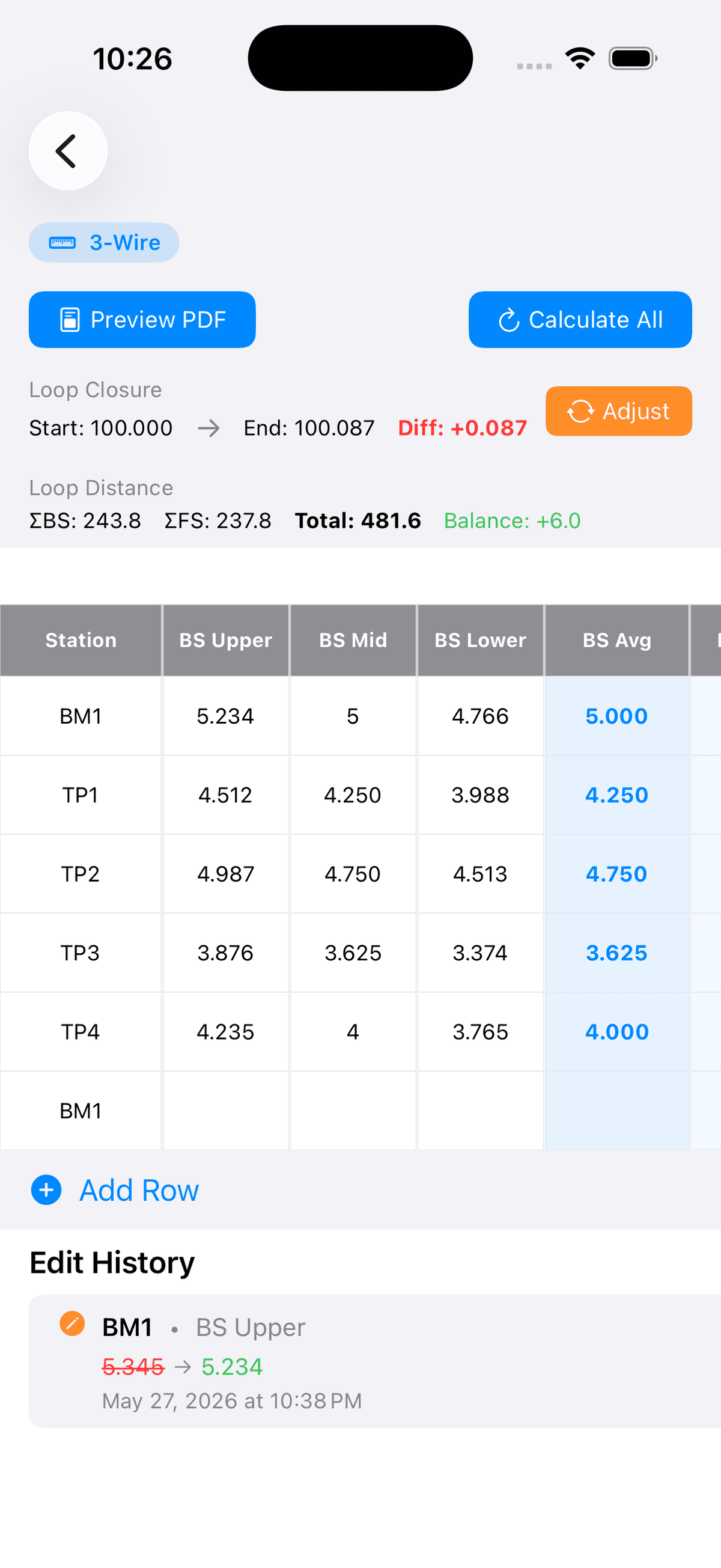
3-wire mode shown — single-wire also supported
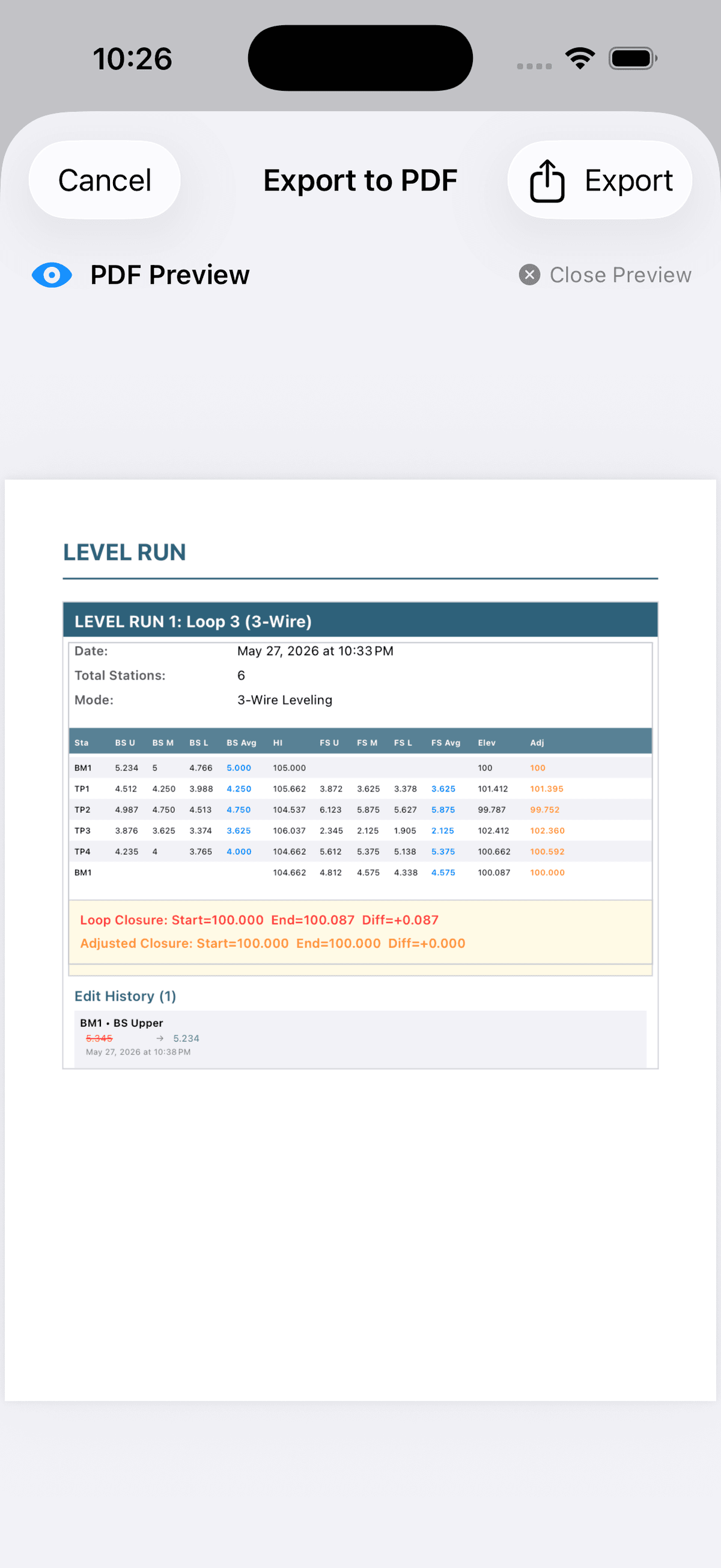
Live closure calculation
Closure error and adjusted elevations update with every reading — catch problems before you leave the site.
Single-wire and 3-wire modes
Switch between leveling methods per loop. 3-wire averages calculate automatically.
Client-ready in one tap
The PDF comes out formatted and complete — no retyping, no reformatting at the office.
Utility inverts, structure by structure
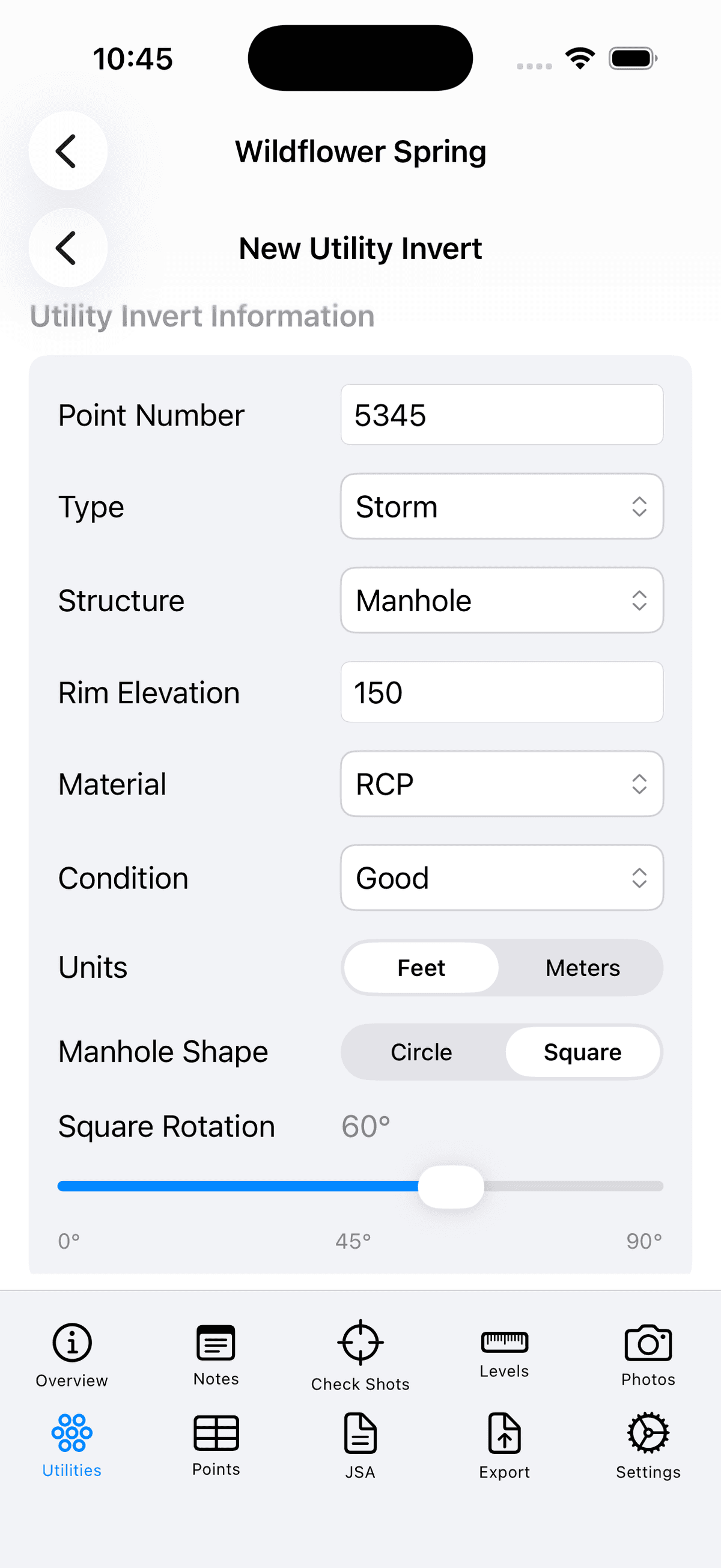
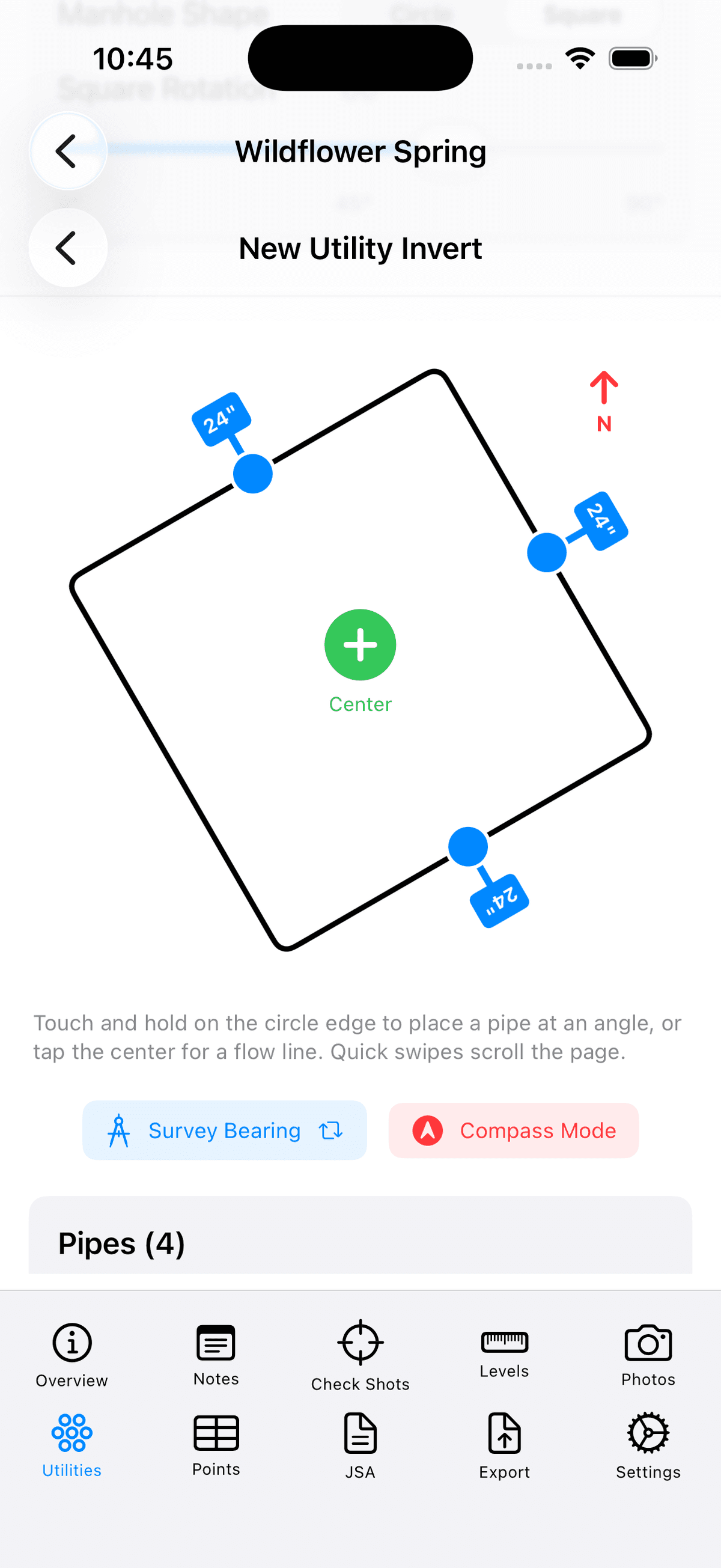
Enter structure details, place each pipe on an interactive diagram, then export a clean invert sheet — with the diagram, elevations, and field notes all in one page.
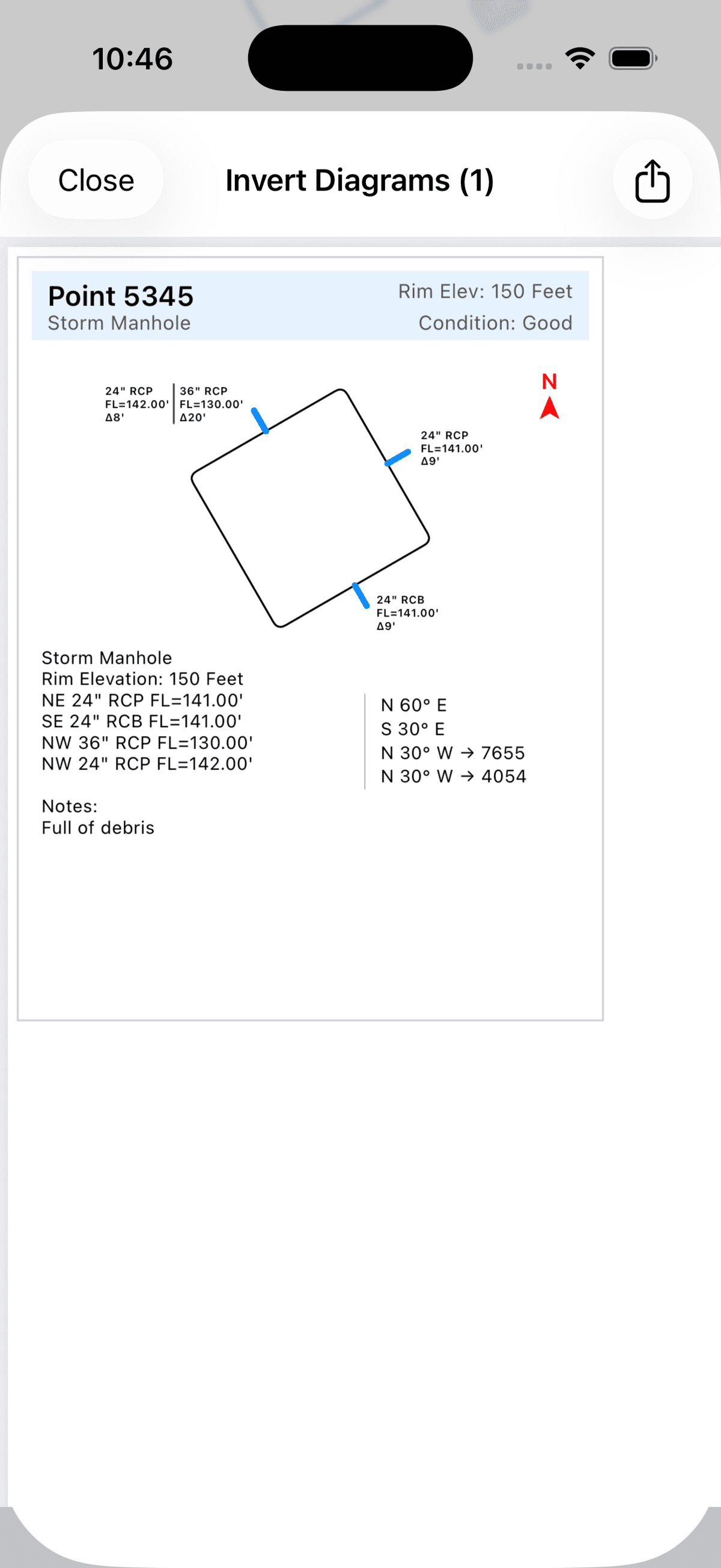
Every pipe, every direction
Enter size, material, invert elevation, and bearing for each pipe. IN/OUT direction is tracked automatically.
Diagram builds as you go
Place pipes by survey bearing or compass. The structure diagram updates live — no sketching required.
One page per structure
The PDF page includes the diagram, all pipe data, rim elevation, condition, and field notes — ready to hand to a client.
Everything a Party Chief actually needs
Built around how field work happens, by people who've held a rod.
Core field tools
Level loops with closure adjustment
Record single-wire or 3-wire differential leveling runs station by station. Heights of instrument and elevations calculate as you type. Close the loop and SlateTablet shows the closure error and redistributes it across your turning points automatically.
Inverts and manhole structures
Enter manholes and structures pipe by pipe — IN/OUT, size, material, direction, invert. Export each structure as a clean PDF page. No freehand diagrams, no guessing what they meant later.
Point ranges and tables
Capture point ranges as individual entries or build a full tabular log — point numbers, descriptions, coordinates — and export it as a deliverable instead of retyping into Excel later.
Photos with GPS and point tags
Photos are tied to the job with point number, location description, and GPS coordinates. Mark any photo as a full page in the PDF — the rest get a clean thumbnail grid.
Weather, location, and JSA
Weather and temperature pull automatically. Job site location is captured on the first shot. The Job Safety Analysis form lives inside the job — fill it out at start of day, sign, and it's part of the deliverable.
Works without cell service
Every entry — notes, levels, photos, structures — saves to the device the moment you tap it. No internet required, ever. Your data stays on your device, under your control — not in a third-party cloud.
Built for the office too
Manage your whole team from one place
Add crew members by email, assign roles, and control access from the web portal. Each person gets their own login. Remove a user and their access is revoked immediately — no shared passwords, no shared devices.
Deliverables go straight from the field
Crew exports a PDF from the app and sends it — by email, AirDrop, or any iOS share method. The office receives a formatted deliverable from the field without any transcription, scanning, or processing.
Client-ready PDFs in one tap
Every workflow has a tailored PDF template — level loops, invert sheets, structure diagrams, JSA, combined summaries — formatted to look like deliverables, not screenshots.
Why not just use a notes app?
Notes apps are built for lists and reminders. SlateTablet is built for surveyors.
Blank text field — no structure
Guided fields for level loops, inverts, point ranges, and JSA. Nothing gets missed.
Manual math, or none at all
HI, elevations, loop closure, and 3-wire averages calculate as you type.
You build the PDF yourself
Surveying-specific PDF templates — level loops, invert sheets, JSA — formatted like deliverables.
Photos floating in the camera roll
Photos tagged to job, point number, and GPS coordinate. Included in the PDF automatically.
One person, one device
Multi-user company workspace with role-based access. Admin, Party Chief, and crew member roles.
Deliverables take days to produce at the office
PDF exported from the app at the jobsite and shared directly — the deliverable leaves the field the same day.
Built for surveyors, by a surveyor
SlateTablet was built by someone who has carried a field book, run level loops, and spent too many nights rewriting notes that should have been digital from the start.
Every feature is here because it solves a problem that actually comes up on a job site. If it doesn't, it doesn't make the cut.
Free tools, no account needed
The calculators we built for ourselves, open to anyone. No signup, no paywall, no ads — they run entirely in your browser.
Horizontal Curve Calculator
Degree of curve to radius, every curve element from any two knowns, and PC/PT stationing.
Level Loop Calculator
Run a loop, check your misclosure, and see whether it holds tolerance before you leave.
Deed Plotter
Plot a metes-and-bounds description and see the closure error on the traverse.
PLSS Aliquot Calculator
Build and visualize sectionalized descriptions on an interactive section diagram.
Traverse Closure Calculator
Closure and precision on a closed traverse, with Bowditch, Transit, and Crandall adjustment.
State Plane / UTM Converter
Convert between geographic coordinates and State Plane or UTM grid coordinates.
Simple, transparent pricing.
Monthly and annual plans cover your full crew.
Monthly
Billed monthly. Cancel any time.
- All features included
- Offline-first mobile app
- PDF export on every job
- Admin dashboard
- Free trial included
Annual
$8.33/month billed annually. Two months free.
- Everything in Monthly
- Two months free vs. monthly
- Priority support
Running more than 10 crews? Contact us for volume pricing. Working solo? Monthly and yearly plans are also available directly in the iOS app.
Common questions
Does SlateTablet work without cell service?
Yes. SlateTablet requires no internet connection — ever. You can capture level loops, inverts, point ranges, photos, and JSA with no cell signal. All data stays on your device.
Who is SlateTablet built for?
Land survey crews. It handles survey-specific workflows — differential leveling, pipe invert calculations, field sketches, and PDF exports — that generic note apps don't cover.
How does the seat model work?
Company Admins purchase seats through the portal and invite crew members by email. Each crew member gets their own login. You only pay for active users.
Can I use SlateTablet without a company account?
Yes. If you're working solo, you can subscribe individually directly from the iOS app — monthly or yearly. This is separate from the company/team seat model and is purchased and managed entirely through the App Store.
What happens to my data if I cancel?
Your field records are yours. You can export everything as PDFs before cancelling. We don't delete data immediately — you'll have time to retrieve anything you need.
Is SlateTablet available now?
Yes. Create your company account and purchase seats today at app.slatetablet.com, and the iOS app is available now on the App Store.
Start replacing your field book today.
Create your company account and invite your crew — the field book stays in the truck.
Get StartedTakes less than 2 minutes to set up.